Writings 2026
Advanced use cases of the Vercel AI SDK
I’ve seen many YouTube videos and blog posts about the usage of the Vercel AI SDK at a basic level, as described in the official docs, but none of them go into the details of the following:
- How do we persist the chat conversations to a SQL DB?
- How can a user edit a previous message and resubmit?
- How can users switch back-and-forth between different chat branches after editing a message?
- How can users regenerate an LLM response?
- How can users switch back-and-forth between regenerated responses?
In this post, I’ll walk you through the backend and frontend data structures required to implement the features mentioned above.
Before we get started, here’s the tech stack:
- Next.js App Router frontend + APIs
- PostgreSQL DB used with Prisma ORM
- Vercel AI SDK for LLM code, both in the front and the backend
I’m going to skip over all the boilerplate setup (e.g., creating a DB, etc.) and go straight into the AI SDK implementations.
Understanding the Data Structure
At the core of all this, we need to understand what the data structure of a chat conversation looks like, and that is a directed asyclic graph (aka DAG). What does this look like?
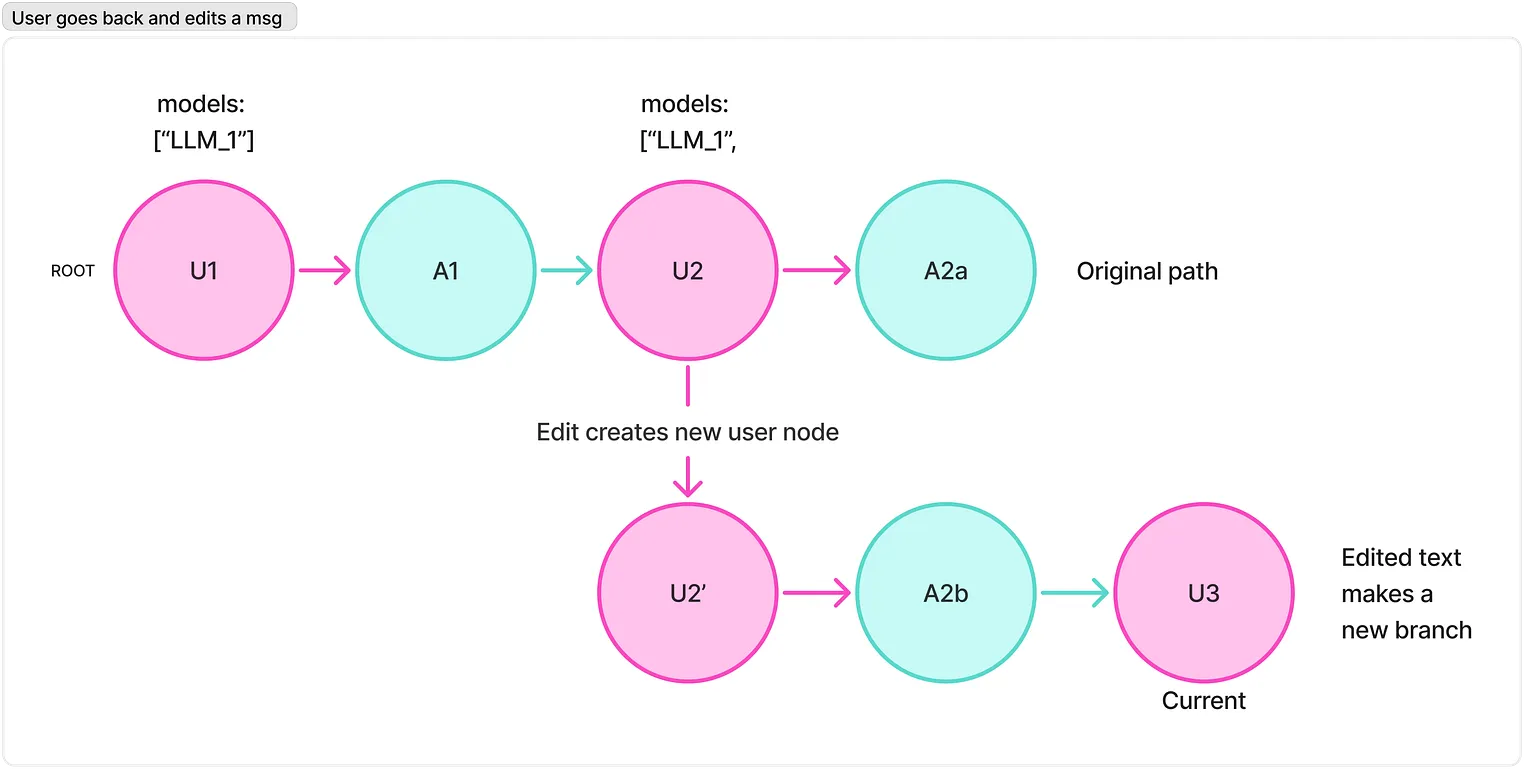
This is a tree data structure. At its core, every chat conversation, even if there’s been no edits, is a tree, where each node (chat) keeps track of its parent (the chat before it, or null for the first message), and its children.
Here’s what that looks like, when stored in the DB, when I ask “Why is the sky blue?”:
{
  "history": {
    "messages": {
      "AJluLZTR8O9Hzsvu": {
        "id": "AJluLZTR8O9Hzsvu",
        "role": "user",
        "parts": [
          {
            "text": "Why is the sky blue?",
            "type": "text"
          }
        ],
        "models": ["some_llm"],
        "content": "Why is the sky blue?",
        "parentId": null,
        "timestamp": 1780946280,
        "childrenIds": ["qr8xZj1kveZ8uhCA"]
      },
      "qr8xZj1kveZ8uhCA": {
        "id": "qr8xZj1kveZ8uhCA",
        "role": "assistant",
        "model": "some_llm",
        "parts": [
          {
            "type": "step-start"
          },
          {
            "text": "The sky appears blue due to...",
            "type": "text",
            "state": "done"
          }
        ],
        "content": "The sky appears blue due to...",
        "parentId": "AJluLZTR8O9Hzsvu",
        "timestamp": 1780946292,
        "childrenIds": []
      }
    },
    "currentId": "qr8xZj1kveZ8uhCA"
  }
}
Notice the following:
- The history object contains a messages DAG object and a currentId pointer. The currentId is what I’ll explain later, it’s used in the UI to manage which branch the user is on (after edits).
- Each message has its own id but also stores childrenIds[] . The children IDs array contains pointers to the next message. In a chat with no edits/regenerations, the childrenIds[] will just contain 1 item (the next message).
How do we persist chats?
The flow is this:
- User sends message
- LLM streams back a response
- Once response is done, persist the whole chat turn
We do this using the useChat on the frontend, and using createUIMessageStreamResponse in the backend.
In the frontend
useChat takes in an transport, onFinish, and onError, and an id to identify the chat. The main part happens in the onFinish hook, which fires when the LLM stream is done.
export interface Usage {
  totalTokens?: number;
  [k: string]: unknown;
}

export interface MessageMetadata {
  timestamp?: number;
  usage?: Usage;
  model?: string;
  reasoningDuration?: number;
}const transport = useMemo(() => new DefaultChatTransport({ api: '/api/chat' }), []);
const {
messages,
sendMessage,
setMessages,
status,
regenerate: originalRegenerate,
stop,
} = useChat({
transport,
...(chatId && { id: chatId }),
onFinish: async ({ message: assistantMessage }: { message: UIMessage }) => {
// Stamp a timestamp if the server didn't send one. We rely on this later
// to order messages chronologically when rebuilding the DAG in the UI.
const timestamp = Math.floor(Date.now() / 1000);
const metadata = assistantMessage.metadata as MessageMetadata | undefined;
if (!metadata?.timestamp) {
assistantMessage.metadata = { ...metadata, timestamp }; // add ours
}
// persist the whole thing to our pgsql db
await persistChatTurn(assistantMessage);
},
onError: (error) => {
console.error('Chat stream error:', error);
},
});messages is the linear thread currently on screen which is a flat UIMessage[], not the DAG.
The DAG itself only exists in 2 places:
- in memory via a ref
- in the database.
The job of persistChatTurn is to take that on-screen UIMessage[] and turn it into a DAG and then save it.
persistChatTurn()
A few refs do a lot of heavy lifting here, so let me introduce them first:
// The full DAG across ALL branches.
// The on-screen messages array is only ever one path through this graph.

const fullDagRef = useRef<MessageMap>({});// A non-stale mirror of `messages`.
// onFinish runs inside a closure that captured messages from an earlier render, so we read from this ref instead.
const messagesRef = useRef<UIMessage[]>([]);
useEffect(() => {
messagesRef.current = messages;
}, [messages]);// The id of the message at the tip of the branch we're currently looking at
const activeHeadIdRef = useRef<string | null>(null);const persistChatTurn = useCallback(
async (assistantMessage: UIMessage) => {
if (!chatId) return;
activeHeadIdRef.current = assistantMessage.id;
const allMessages = messagesRef.current;
// Only persist if this assistant message is the newest one in the thread.
// Guards against a stale response from a previous turn writing over a newer one.
if (!shouldPersistChatTurn({ assistantMessage, allMessages })) return;
// 1. Rebuild the on-screen thread into DAG nodes (parentId/childrenIds wiring).
const { history, conversationMessages } = buildConversation({
messages: allMessages,
assistantMessage,
activeHeadId: activeHeadIdRef.current,
});
// 2. Fold that thread back into the full DAG so sibling branches survive.
const mergedMessages = mergeDAG(fullDagRef.current, history.messages);
fullDagRef.current = mergedMessages;
const mergedHistory: ChatHistory = {
messages: mergedMessages,
currentId: history.currentId,
};
// 3. POST the whole DAG to our API route, which writes it to Postgres.
await persistChat({
chatId,
body: createChatPayload({ history: mergedHistory, conversationMessages }),
});
},
[chatId],
);As you can see above, the following 3 steps need to happen:
- Build the DAG from a flat array of UIMessage[]
- Merge branches so nothing gets lost
- Save to the backend
Let’s look at #1:
export const buildConversation = ({
  messages,
  assistantMessage,
  activeHeadId,
}: BuildConversationArgs): BuildConversationResult => {
  const history: ChatHistory = { messages: {}, currentId: assistantMessage.id };
  const conversationMessages: Message[] = [];

  // The user message that assistant replies in this turn attach to.
  let currentUserMessageId: NodeId | null = null;

  // Assistant message ids from this turn - the next user message attaches to the last one.
  let currentTurnAssistantIds: NodeId[] = [];

  // Sort by timestamp so parent/child wiring follows actual chat order.
  const chronologicalMessages = [...messages].sort((a, b) => {
    return getMsgTimestampSeconds(a) - getMsgTimestampSeconds(b);
  });

  for (const message of chronologicalMessages) {
    let parentId: NodeId | null = null;

    if (message.role === 'user') {
      parentId = currentTurnAssistantIds.at(-1) ?? null;
      currentUserMessageId = message.id;
      currentTurnAssistantIds = [];
    } else {
      if (!currentUserMessageId) continue;
      parentId = currentUserMessageId;
    }

    const node: Message = {
      id: message.id,
      parentId,
      childrenIds: [],
      role: message.role,
      content: joinText(message), // flattened text, handy for search/grep
      timestamp: getMsgTimestampSeconds(message),
      ...(message.parts ? { parts: message.parts } : {}),
    };

    history.messages[message.id] = node;
    conversationMessages.push(node);
    addHistoryChild(history, parentId, message.id); // push id into parent.childrenIds

    if (message.role === 'assistant') {
      currentTurnAssistantIds.push(message.id);
    }
  }

  // The head of the branch we want to consider "current".
  history.currentId = activeHeadId ?? assistantMessage.id;

  return { history, conversationMessages };
};
addHistoryChild does this:
- Takes in the chat history, the parent ID, and the child ID
- If there’s no parent, return.
export const addHistoryChild = (
  history: ChatHistory,
  parentId: NodeId | null,
  childId: NodeId,
): void => {
  if (!parentId) return;

  const parent = history.messages[parentId];
  if (!parent) return;

  if (!parent.childrenIds.includes(childId)) {
    parent.childrenIds.push(childId);
  }
};